Build a Custom Named Entity Visualizer with Google NLP
Entity SEO has been a hot topic since at least 2012–13, when Google released its Knowledge Graph and the Hummingbird algorithm. It’s a core concept for semantic SEO and NLU/NLP. The term “entity” appeared dozens of times in the leaked Google API modules. This tutorial assumes you have a basic understanding of entities and natural language processing. If not, see these two resources: Entity SEO and Natural Language Processing.
Table of Contents
Entity SEO
- Optimizes web content to improve association with specific entities recognized by search engines.
- Entities are distinct, well-defined concepts such as people, places, organizations, events, or things.
- Aims to enhance the visibility and relevance of content related to these entities in search engine results.
Named Entity Recognition (NER)
- Sub-task of information extraction in NLP.
- Focuses on identifying and classifying named entities into categories like person names, organizations, locations, dates, and other proper nouns.
- Crucial for structuring unstructured text for easier analysis and meaningful information extraction.
- Applications include improving search engine results, information retrieval, sentiment analysis, and enhancing machine translation.
- Uses machine learning models trained on annotated datasets to recognize patterns and features indicating named entities.
- Common approaches: Conditional Random Fields (CRFs), Hidden Markov Models (HMMs), and deep learning models like recurrent neural networks (RNNs) and transformers.
One way to learn which entities appear in our content is to use a named-entity visualizer. This approach is not very scalable because visualization is manual; it is best suited to one-off analyses.
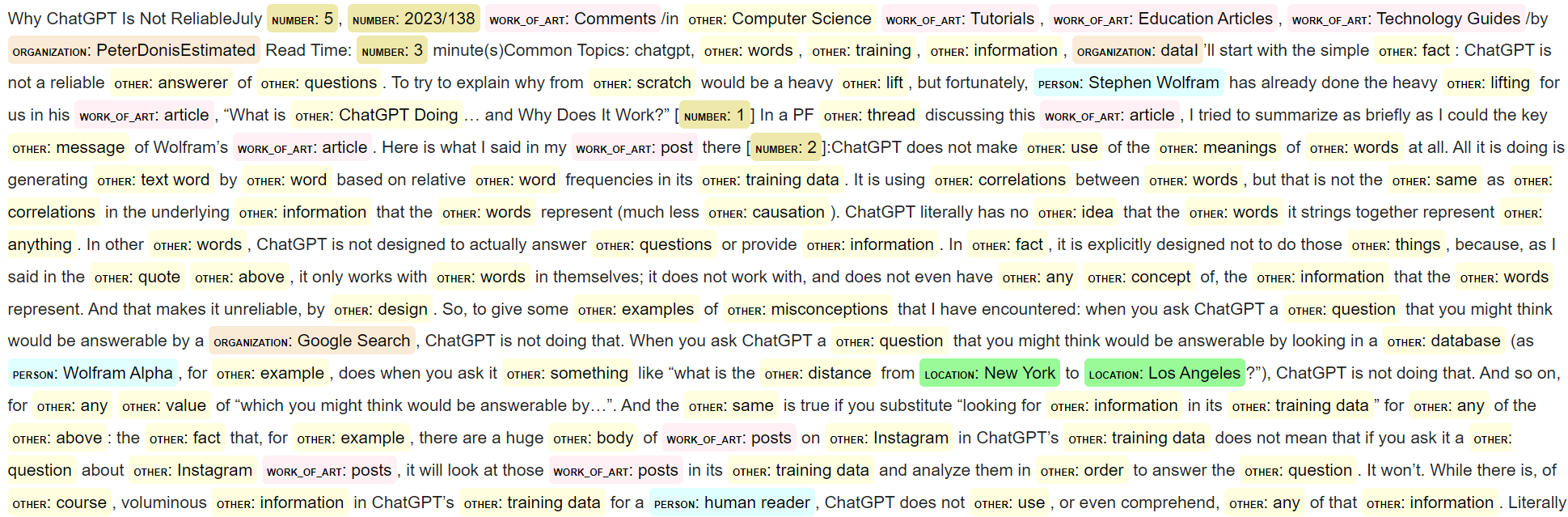
This Python SEO tutorial shows how to build a framework that sends text to the Google Natural Language API and transforms the results into a color-coded visual of entity types. With this, you can more easily understand entities, their types, and relationships in your content. It’s straightforward and requires few lines of code.
Note that spaCy provides a free visualizer called displaCy, but in testing its NER performed significantly worse than Google Natural Language. Using Google gives a closer view of how Google may interpret your content.
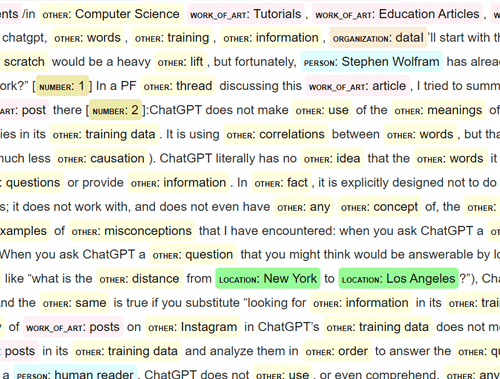
Below is an example of blog content processed by the code we’re going to build in this tutorial for the article Why ChatGPT is not Reliable.
Requirements and Assumptions
- Python 3 is installed, and you understand basic Python syntax
- Access to a Linux installation (I recommend Ubuntu) or a Google Colab-style notebook
- Google Natural Language (CNL) API enabled + service account JSON file
- Basic understanding of entities, NLP, and semantic SEO
- Be careful when copying code: indentation may not be preserved
Get your CNL API Service Account
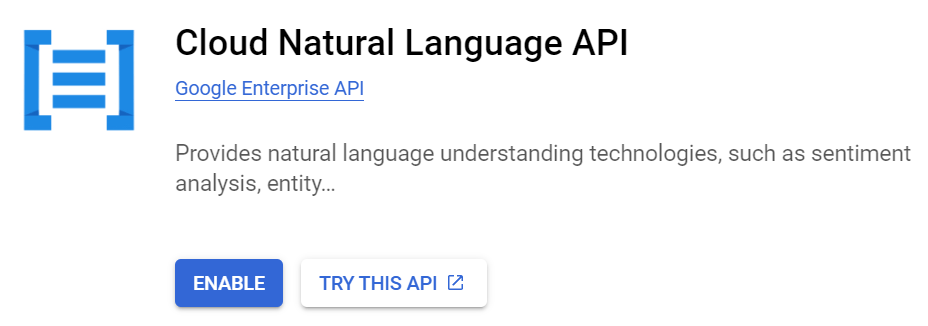
Getting a service account for the CNL API is straightforward. CNL is the API that performs the NER processing. Ensure you have access to the Google Cloud Platform with a billing account, as the Natural Language API is paid (but inexpensive). Head over to the Google Cloud Natural Language API page. You’ll see a blue “Enable” button. Create a service account in the credentials menu (left sidebar) for the API and download the JSON key file when prompted. You’ll use that JSON key to authenticate.
Importing Libraries
from google.cloud import language_v1
from google.oauth2 import service_account
from IPython.core.display import display, HTML
import os
import requests
from bs4 import BeautifulSoup
import re
from html import escape
- language_v1: processes the text for NLP
- service_account: handles Google Cloud authentication
- display, HTML: for rendering the HTML that builds the visualizer
- requests: grabs the page text from the specified URL
- BeautifulSoup: parses the source code HTML to get the article text
- re: for the text replacement to label the named entities
- escape: safely handle processing
After importing the modules, create a function that sends article text to the Google Cloud Natural Language API. The following explains each step:
- Load the service account credentials (assuming you renamed your JSON file data.json)
- Initialize the Google Cloud Language API client
- Create a document with content from the provided text
- Analyze entities in the document
- Return the entities found in the text
def analyze_entities(text):

    credentials = service_account.Credentials.from_service_account_file("data.json")
    client = language_v1.LanguageServiceClient(credentials=credentials)
    document = language_v1.Document(content=text, type_=language_v1.Document.Type.PLAIN_TEXT)
    response = client.analyze_entities(document=document)
    return response.entities
The next step is writing the function that handles the text replacements for the HTML output of the visualizer. It takes the entity list from the CNL API and the article text, matches each entity back to the text, and replaces it with HTML markup that includes an entity-type prefix and color from the entity type color map. Feel free to alter the colors to a web-safe palette that works for you; lighter colors tend to work best.
The function works by the following:
- Escape HTML special characters to prevent XSS or unintended HTML rendering
- Define a color map for different types of entities recognized by the Google Cloud Language API
- Perform text replacements on the original text to add the colored labels for each entity type
- Feel free to edit the HTML markup to format the labels in a way that works for you
- Create regex patterns with word boundaries so replacements do not occur inside other words
- Compile a single regex from all the patterns for efficiency
def visualize_entities(text, entities):
    text_html = escape(text)

    color_map = {
        "UNKNOWN": "lightgray",
        "PERSON": "lightcyan",
        "LOCATION": "PaleGreen",
        "ORGANIZATION": "AntiqueWhite",
        "EVENT": "Thistle",
        "WORK_OF_ART": "LavenderBlush",
        "CONSUMER_GOOD": "LightSkyBlue",
        "OTHER": "LightYellow",
        "PHONE_NUMBER": "MediumSeaGreen",
        "ADDRESS": "Salmon",
        "DATE": "Honeydew",
        "NUMBER": "PaleGoldenrod",
        "PRICE": "MistyRose"
    }

    replacements = {}
    for entity in entities:
        entity_type = language_v1.Entity.Type(entity.type_).name
        color = color_map.get(entity_type, "black")
        escaped_entity_name = escape(entity.name)
        replacement_html = f"<mark style='background-color: {color}; padding:4px; border-radius:4px;line-height:1.9;'><span style='font-size:8px;font-weight:bold;'>{entity_type}</span>: {escaped_entity_name}</mark>"
        pattern = f'\\b{re.escape(escaped_entity_name)}\\b'
        replacements[pattern] = replacement_html

    regex_patterns = re.compile('|'.join(replacements.keys()), re.IGNORECASE)
Next, build the function that takes a user-specified URL and scrapes the page for text. We only want to process the main content of the article, not every element on the page. To do this, the code searches for the <article> tag and uses that content. If your site does not use an <article> tag, adjust the function to either process the entire page or locate the CSS class that wraps your main content (for example: article_div = soup.find('div', class_='article')).
This function behaves as follows:
- Initiate the BeautifulSoup scraper
- Extract text content from the <article> tag
- Insert missing spaces after periods to improve readability and entity separation
def get_text(url):
    html = requests.get(url).text
    soup = BeautifulSoup(html, 'html.parser')
    article = soup.find('article')
    if not article:
        return html, "No article tag found in the HTML content."

    cleaned_text = article.get_text()

    cleaned_text = re.sub(r'\.\s*(?=[A-Za-z])', '. ', cleaned_text)

    return html, cleaned_text
Finally, we write the code that starts everything. This script does the following:
- Input a URL of your choosing
- Send the URL to the function that scrapes the text and returns the HTML and cleaned text
- Send the cleaned text to the function that processes the text for entities using CNL
- Send the entities and cleaned text to the function that performs the text replacements to build the named entity visualizer
- Use the display and HTML functions to render the new marked-up text with the entity labels.
url = "https://www.physicsforums.com/insights/why-chatgpt-is-not-reliable/"
html, clean_text = get_text(url)
entities = analyze_entities(clean_text)
html_output = visualize_entities(clean_text, entities)

display(HTML(html_output))
Example
The output for that URL matches the image shown above.
Conclusion
Now you have a framework for analyzing and visualizing named entities in articles using the Cloud Natural Language API. Try to make my code more efficient and extend it in ways I haven’t considered—this is just the beginning of what you can do. Hopefully, you’re now ready to explore semantic SEO in more depth. Note that a few small issues remain in the script that require further ironing:
- Preserve original spacing in the article
- Refine methods to ensure text does not mash together when stitched back together
- The formatting of the output is not perfect; I am not a designer
Now get out there and try it out! Follow me on Twitter and share your Python SEO applications and ideas!
Named Entity Recognition FAQ
What are some common challenges in NER?
Common challenges include handling ambiguity (e.g., “Apple” as a fruit vs. the company), dealing with entities not seen during training (out-of-vocabulary issues), and managing variations in entity names (e.g., “U.S.A.” vs. “United States”). NER systems must also cope with different languages, text styles, and domains.
What datasets are commonly used for training NER models?
Some well-known datasets for NER include the CoNLL-2003 dataset, the OntoNotes dataset, and the ACE (Automatic Content Extraction) corpus. These datasets provide annotated text that includes named entities and their categories.
How do you evaluate the performance of an NER system?
The performance of an NER system is typically evaluated using precision, recall, and F1-score. Precision measures the accuracy of the named entities identified, recall measures the system’s ability to find all relevant named entities, and the F1-score is the harmonic mean of precision and recall, providing a single measure of overall performance.
What are some applications of NER?
Applications of NER include:
- Information Retrieval: Enhancing search engines by indexing named entities for better search results.
- Content Recommendation: Personalizing content based on recognized entities in user interests.
- Customer Support: Automatically categorizing and routing customer inquiries based on detected entities.
- Medical Text Analysis: Identifying medical terms, drugs, and conditions in clinical records.
- Financial Analysis: Extracting company names, stock tickers, and financial events from news articles.
What tools and libraries are available for NER?
Several tools and libraries are available for NER, including:
- spaCy: An open-source library with pre-trained NER models.
- NLTK (Natural Language Toolkit): Provides various tools for NER, including integration with the Stanford NER tagger.
- Stanford NER: A Java-based library offering state-of-the-art NER models.
- OpenNLP: An Apache project that includes tools for NER.
- AllenNLP: A library built on PyTorch for deep learning-based NLP tasks, including NER.
Can NER be used for languages other than English?
Yes, NER can be applied to various languages. However, the availability of annotated datasets and pre-trained models for different languages can vary. Languages with rich morphology, such as Arabic or Russian, may pose additional challenges for NER systems.
What are the latest advancements in NER?
Recent advancements in NER include the use of transformer-based models like BERT, RoBERTa, and GPT. These models leverage large-scale pre-training on diverse text corpora, enabling better generalization and improved performance on NER tasks. Additionally, transfer learning and multilingual models have shown promise in enhancing NER capabilities across different languages and domains.
This FAQ section was written with help from GenAI

- Evaluate Subreddit Posts in Bulk Using GPT4 Prompting - December 12, 2024
- Calculate Similarity Between Article Elements Using spaCy - November 13, 2024
- Audit URLs for SEO Using ahrefs Backlink API Data - November 11, 2024